
Twitch Lurker
by mikeyaworski4.2
53 reviews
10.0K
users
Published
July 11, 2024
Screenshots


Description
Recent Update: There may be some bugs in the most recent update (v3.0.0) because there was a big overhaul to migrate to manifest v3. A lot of functionality changed with browser extensions, so be patient while bugs get fixed.
Support your favorite Twitch streamers by automatically lurking in their stream when they go live.
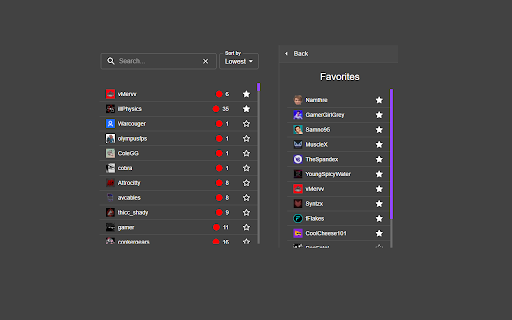
Twitch Lurker allows you to build a list of favorites based on who you follow and open up muted tabs of their stream as soon as they go live.
IMPORTANT: You must have tabs already open with the Twitch player running in order for you to count as a viewer in their viewer count. If the extension loads a new tab with a stream, it won't count you as a viewer until you open the tab and load the player yourself.
***
How to use the extension:
1) Download/Install from the store or sideload it in your browser
2) Login with OAuth so we can pull your follow list (don't worry, we don't collect any of your info)
3) Click the stars next to channels in your following list to mark them as Favorites
4) Order your Favorites list to your liking (the higher in the list, the higher their priority over other Favorites)
5) Open two tabs with live streams
6) You are now supporting your favorite content creators and gaining free channel points!
If you would like to support this extension feel free to hit the "buy me a coffee" button in the extension or drop me Twitch Prime sub @ twitch.tv/ErianasVow .
It'd help me a lot and all proceeds go to further development of the extension!
***
If you'd like to view or contribute to the source code: https://github.com/mikeyaworski/Twitch-Lurker