PagePixels Screenshots
by PagePixels Screenshots5.0
1 reviews
128
users
Published
March 28, 2025
Screenshots


Description
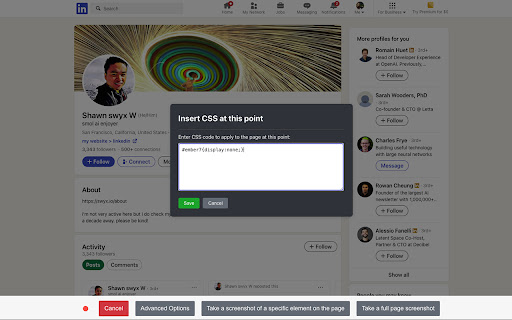
PagePixels Screenshots – The easiest way to capture, schedule, and automate screenshots directly from your browser.
What It Does:
🖼️ Captures Full-Page & Element Screenshots – Grab the entire page or just focus on a specific element with one click.
🔄 Records & Replays Actions – PagePixels remembers your clicks, form inputs, and scrolling, then replays them for perfectly retaken screenshots. Events are stored on your computer and are never shared with PagePixels.
⏰ Automated Scheduling – Set screenshots to run on your schedule, with options for specific days and time windows.
🚀 Seamless Integration – Works with Make and Zapier just like our API and web interface, so you can trigger screenshots, automate workflows, and send results anywhere.
🔒 Secure & Private – Uses secure OAuth login with no stored passwords. Your screenshots are linked to your account and never shared.
Why Install?
⚡ Save Time – No more manual captures—automate and focus on what matters.
🎯 Consistent Results – Retake identical screenshots with replayed actions for precision.
🔗 Works With Your Workflow – Connects effortlessly with PagePixels, Make, and Zapier for powerful automation.
✅ Simple & Fast – Lightweight, easy to use, and runs quietly in the background.
📩 Install now and capture smarter with PagePixels Screenshots.