Mr.Jimaku
by eetann5.0
1 reviews
108
users
Published
May 10, 2024
Screenshots
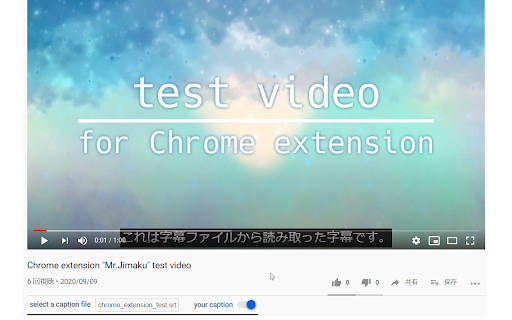
Description
- If you have a caption file, you can watch the video with the caption
- Of course, you can also use files that were given by someone else
- You can turn on or off the display of the caption
**⚠ We're assuming UTF-8 character set for the caption file.**
1. View YouTube video page in chrome
2. Select a caption file in the box under the title
You can turn off the caption by pressing the switch next to the box.
Here's how to write a caption file. It's the format of the srt file.
```text
1
00:00:00,000 --> 00:00:07,560
これは字幕ファイルから読み取った字幕です。
2
00:00:10,230 --> 00:00:14,700
This is a test video
```
1. Write timestamp for start time and end time of the text to be displayed
2. Write the text one line below the timestamp
Timestamp is written like `hh:mm:ss,sss --> hh:mm:ss,sss`.
`hh` is the hour, `mm` is the minute, `ss` is second, and `sss` is millisecond.
`:` is a;
`hh`, `mm` and `ss`,
and `,` is a;
`hh:mm:ss` and `sss`.
Start time, ` --> `, and end time, in that order.
Actually, if it's written in this format,
you don't have to worry about the file extension.