Gridlines
by Apodemeo Labs5.0
1 reviews
107
users
Published
April 20, 2025
Screenshots


Description
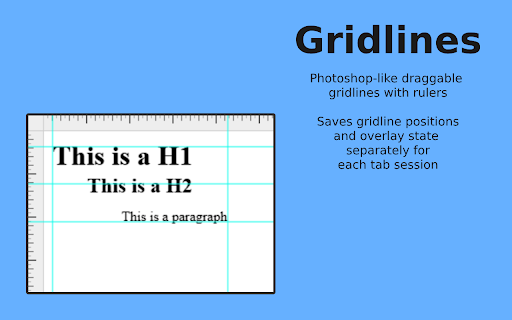
Gridlines is a sleek, intuitive, and powerful Chrome extension that brings Photoshop-inspired grid functionality right to your browser. Whether you're aligning elements, planning layouts, or just adding a bit of design precision, Gridlines makes it effortless.
Key Features:
- Draggable Gridlines: Enjoy Photoshop-like gridlines and rulers that let you drag and position with precision.
- Instant Toggle: Quickly activate or hide rulers and gridlines using the convenient Alt+Shift+G shortcut.
- Session-Specific Settings: Each tab session saves its own gridline positions and overlay state, keeping your work exactly where you left it.
- Manual Gridline Addition: Precisely place a single gridline by inputting its position in the unit of your choice (px, cm, mm, in, or %).
- Customizable Grid Overlay: Instantly overlay a grid on the screen with adjustable spacing and units for a tailored workspace.
- One-Click Clear: Reset your canvas in a flash by clearing all gridlines with a single click.
Ideal for web developers, designers, and anyone who values precision, Gridlines transforms your browsing experience into a customizable design tool. Try Gridlines today and bring professional-grade organization to your workflow!
Add to Chrome
Quick Info
- Version
- 0.0.10
- Size
- 384KiB
- Price
- Free
- Type
- Extension
Categories
Languages
English (United States)