Open in Sidebar
by chandler.stimson4.3
25 reviews
4.0K
users
Published
April 28, 2024
Screenshots

Description
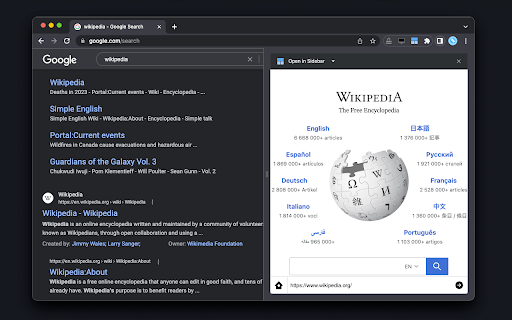
The "Open in Sidebar" extension revolutionizes browsing by allowing you to load any webpage in a convenient sidebar view. Access web content while reading without switching tabs with a click or keyboard shortcut. Drag and drop links or use the built-in address bar for seamless navigation. Enhance productivity by opening online tools like text editors or dictionaries in the sidebar. Reset the view with a single click or load new pages by pasting URLs. Note that some pages with CSP headers may have limitations, but future updates aim to address these.
Features:
Loads any webpage in a convenient sidebar view
Activate the sidebar with a click or assigned keyboard shortcut
Drag and drop links or use the built-in address bar for seamless navigation
Access web content while reading without switching tabs
Enhance productivity by opening online tools like text editors or dictionaries in the sidebar
Intuitive interface with an address bar for easy URL tracking
Reset the view with a single click
Load new pages by pasting URLs into the address bar
Search for dropped text with your preferred search engine (e.g. Google, Bing, or DuckDuckGo)
Supports split view (two panes)