Send from Gmail - Share Link Via Email
by Social Analyzer4.9
67 reviews
6.0K
users
Published
April 10, 2025
Screenshots

Description
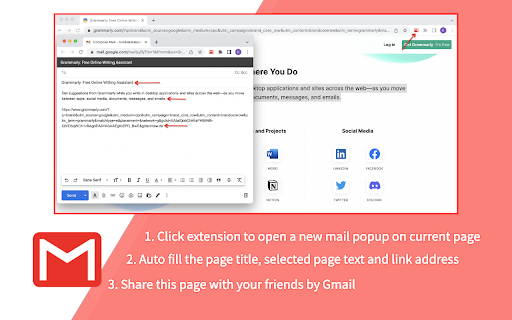
It provides a button that will create a Gmail message when clicked, using the page title as the subject and selected page text and link address as the message. All you have to do is choose a mail recipient and click send.
features:
➔ provides a fast way to quickly send a link to the current website per email to somebody.
➔ works with local Mail clients and WebMail accounts like GMail, Hotmail, etc.
➔ create a new mail window on current page.
For setting the domain name of your "Google Apps for your domain" account, click Options.
options features:
➔ set the domain name of your google account
➔ set a prefix for the subject field when sending from Gmail
Note that if you use a local mail client a default Mail client must be registered on the computer.
this extension was made by third party developers and it is NOT made by Gmail Inc.
Add to Chrome
Quick Info
- Version
- 1.0.5
- Size
- 2.09MiB
- Price
- Free
- Type
- Extension
Categories
Languages
EnglishEnglish (United Kingdom)English (United States)Türkçedanskeestiespañolfrançaishrvatskilatviešulietuviųportuguês (Brasil)português (Portugal)slovenčinaslovenščinačeštinaбългарскирусскийગુજરાતી中文(中国)日本語