Duolingo Word Bank Dnd
by blmage5.0
3 reviews
446
users
Published
April 26, 2024
Screenshots
Description
For more detailed information, a quick demo and screenshots, or if you have any support request, visit the development page of the extension here:
https://github.com/blmage/duolingo-word-bank-dnd
[Important update]
Now that Duolingo natively supports dragging and dropping words, this extension should only be needed if you want to:
- soften the "flying" word animation,
- use keyboard shortcuts to reorder words.
[Features]
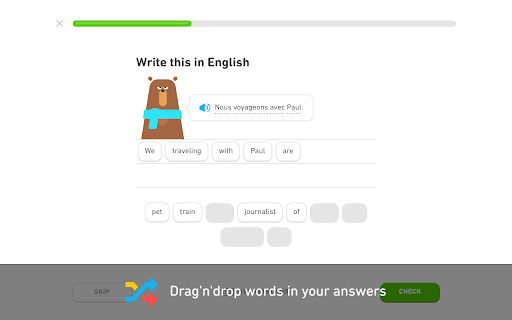
By default, Duolingo does not allow reorganizing the words added to answers using the word bank.
As a result, when sentences are long, making just a few changes can quickly become tedious, because it means you'll have to remove and add back a bunch of unrelated words.
The extension fixes this by allowing you to drag'n'drop words in your answers at any time.
[Keyboard shortcuts]
When a word bank is active (and no other extension has the focus), use:
- the [ ← ] / [ → ] arrows to select a word,
- the [ ← ] / [ → ] arrows while holding [ Ctrl ] to move the selected word around in the answer (release [ Ctrl ] to apply the changes),
- [ Del ] to remove the selected word from the answer,
- [ Backspace ] to remove the last word of the answer.
[Limitations]
The extension is deeply tied to the inner workings of Duolingo, meaning that significant changes on their side could (temporarily) break it. If that happens, you can either:
- wait for me to fix it (you can open an issue on the support page if there is none about it yet),
- if you're a developer, try to fix it yourself, then open a related PR on the development page.
Add to Chrome
Quick Info
- Version
- 2.4.1
- Size
- 52.17KiB
- Price
- Free
- Type
- Extension
Categories
Languages
English (United States)