Promptaa: Prompt Engineering and Library
by pairdot5.0
1 reviews
22
users
Published
July 31, 2025
Screenshots


Description
Promptaa: AI Prompt Engineering and Prompt Library
Upgrade your AI workflow with Promptaa, the chrome extension designed to help you save, organize, and engineer your prompts, all in one place.
Whether you're a developer, marketer, content creator, or just exploring AI prompt engineering, Promptaa gives you the tools to manage your most effective prompts like a pro. It's a prompt library and prompt engineering tool designed to help you save time.
✨ Features You’ll Love:
🪄 Improve prompt quality with one-click prompt engineering
🧠 Save and reuse your best AI prompts
🗂️ Organize prompts by categories
⚡ One-click insert into ChatGPT and other AI tools
We hope you love it as much as we do!
Instructions:
After installing, there are two main elements to interact with.
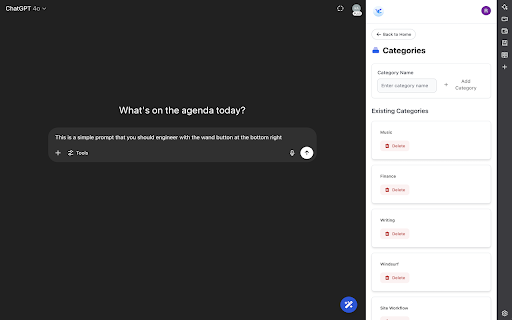
1. The AI enhance button located in the bottom right of the window.
Use: AI enhance prompts on any site where you use AI. This button has two other buttons that will appear once hovered over, the XML enhance button, and the "save prompt" button, which will copy the prompt over for you to save for later re-use.
2. The side-panel, which is opened by clicking the extension icon once installed.
Use: This has your prompt libraries. You can create categories, as well as create and re-use prompts after you've logged in.
Everything between the chrome extension and the web app are synced.
Website: https://promptaa.com
Add to Chrome
Quick Info
- Version
- 0.1.0
- Size
- 3.4MiB
- Price
- Free
- Type
- Extension
Categories
Languages
English (United States)