Google Search Custom Sidebar
by generouslline85
users
Published
June 20, 2025
Screenshots


Description
Google Search Custom Sidebar – Supercharge Your Search!
Tired of digging through menus for Google's advanced search operators?
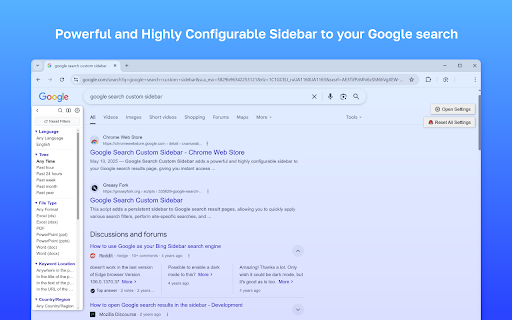
Google Search Custom Sidebar adds a powerful and highly configurable sidebar to your Google search results page, giving you instant access to advanced filters and tools—right where you need them.
Key Features
Quick Filters
* Language: Filter results by specific languages.
* Time: Select from predefined time ranges (past hour, day, week, month, year) or set a custom date range.
* Filetype: Filter by file types like PDF, DOCX, XLSX, PPTX, and more.
* Country/Region: Limit results to specific countries.
* Keyword Location: Choose where your keywords should appear:
* Anywhere in the page (default)
* In the title
* In the text
* In the URL
Enhanced Site Search
* Quickly search within your favorite predefined websites.
* Checkbox Mode (optional): Select multiple sites using checkboxes for combined searches (e.g., site:a OR site:b).
* TLD/SLD Support: Add custom domains like .edu, .gov.uk, or others to your site list.
Essential Tools
* Verbatim Toggle: Instantly switch to Google's exact-match “Verbatim” mode.
* Personalization Toggle: Enable or disable personalized search results.
* Advanced Search Link: Direct access to Google’s Advanced Search page with your current query pre-filled.
* Reset Filters: Clear all sidebar filters in one click.
Highly Customizable
* Section Control: Show, hide, and reorder sidebar sections (Language, Time, Filetype, etc.).
* Appearance: Adjust sidebar width, font size, hover effects, and choose from Light, Dark, Minimal Light, Minimal Dark, or follow system theme.
* Button Placement: Position control buttons (Reset, Verbatim, Advanced Search, Personalization) in the Sidebar Header, Top Block, Tools Section, or hide them entirely.
* Custom Filter Options: Define your own languages, time ranges, filetypes, countries, and favorite sites.
* Accordion Mode: Option to allow only one section to be open at a time.
* Draggable Sidebar: Move the sidebar anywhere on the page by dragging.
How to Use
* The sidebar automatically appears on Google search result pages.
* Click the gear icon (⚙️) in the sidebar header to open settings and customize everything to your needs.
Add to Chrome
Quick Info
- Version
- 1.0.2
- Size
- 181KiB
- Price
- Free
- Type
- Extension
Categories
Languages
DeutschEnglishEnglish (Australia)English (United Kingdom)English (United States)FilipinoIndonesiaKiswahiliMelayuNederlandsTiếng ViệtTürkçecatalàdanskeestiespañolespañol (Latinoamérica)françaishrvatskiitalianolatviešulietuviųmagyarnorskpolskiportuguês (Brasil)português (Portugal)românăslovenčinaslovenščinasuomisvenskačeštinaΕλληνικάбългарскирусскийсрпскиукраїнськаעבריתالعربيةفارسیमराठीहिन्दीবাংলাગુજરાતીதமிழ்తెలుగుಕನ್ನಡമലയാളംไทยአማርኛ中文(中国)中文(台灣)日本語한국어