
SSL Checker by SSLHub.store
by yevhenii.mudrahel5.0
4 reviews
877
users
Published
January 4, 2024
Screenshots


Description
SSL Checker by SSLHub.store - Boost Web Security!
Ensure your website's SSL is in top-notch condition with SSL Checker by SSLHub.store. Our extension makes it easy to diagnose, validate, and fix SSL issues swiftly. Elevate your web security and provide a seamless browsing experience for your users.
How It Works:
- Click the Extension Icon: Locate and click on the SSL Checker icon in your Chrome extensions.
- Enter Domain Name: Input the domain name you want to analyze. For example, try entering "sslhub.store."
- Click "Check SSL": Hit the "Check SSL" button to initiate the analysis.
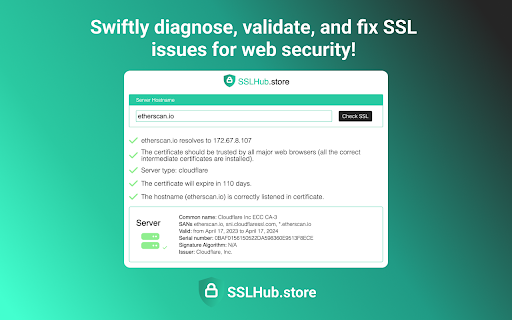
What Our SSL Checker Reveals:
* Domain Information: sslhub.store resolves to [IP Address].
* Certificate Trust: The certificate is trusted by all major web browsers, ensuring optimal user experience.
* Server Details: The website is hosted on [Server Details].
* Certificate Expiry: The certificate will expire in [Days Remaining], allowing you to plan ahead for renewals.
* Hostname Validation: The hostname (sslhub.store) is correctly listed in the certificate.
* Server Certificate Details:
* Common Name: [Common Name]
* SANs: sslhub.store, www.sslhub.store
* Validity: From [Valid From] to [Valid To]
* Serial Number: [Serial Number]
* Signature Algorithm: [Signature Algorithm]
* Issuer: [Issuer]
Make Web Security a Priority - Install SSL Checker by SSLHub.store Today!
Optimize your SSL configuration, identify potential issues, and fortify your website's security. Download SSL Checker by SSLHub.store now and ensure a safe and secure browsing environment for your users.
Add to Chrome
Quick Info
- Version
- 1.0.1
- Size
- 439KiB
- Price
- Free
- Type
- Extension
Categories
Languages
English (United States)