
ToolBrowser
by hocgin5.0
1 reviews
77
users
Published
October 31, 2023
Screenshots
Description
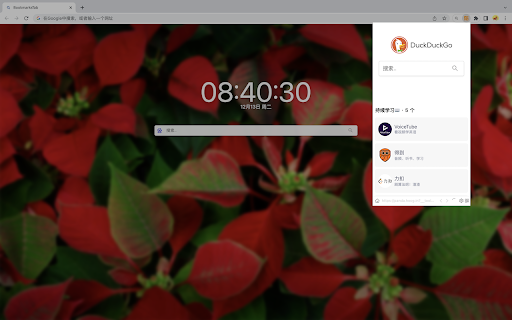
This application offers users a convenient way to access a mini browser directly from the toolbar. It enables easy browsing of web content and performing related actions without the need to switch windows. Its key features include user-friendliness and simplicity, allowing quick access to web content and related operations.
To enhance efficiency, you can activate the "Quick Mode" by pressing `⌃ + ⇧ + X` on any page. This mode enables clicking on links to open them in the "ToolBrowser" for further actions. Additionally, you can open the "ToolBrowser" popup window by pressing `⌃ + ⇧ + D`.
To configure shortcut keys, you can visit `chrome://extensions/shortcuts`.
If you encounter any issues while using the application, there's no need to worry. Writing negative reviews won't solve the problem. Instead, you can provide feedback through the following link, and I'll address it promptly:
👉 https://logspot.hocgin.top/addone-toolbrowser?active=feedback 👈
If you find this application helpful, I would greatly appreciate your positive review. 🌹
Add to Chrome
Quick Info
- Version
- 1.0.16
- Size
- 540KiB
- Price
- Free
- Type
- Extension
Categories
Languages
English中文(中国)中文(台灣)