Lazy Click Search
by Ross Cumming5.0
1 reviews
22
users
Published
October 26, 2021
Screenshots

Description
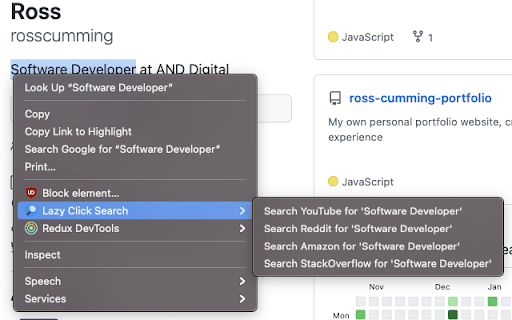
Lazy Click Search is an extension that provides users with a much simpler and efficient way to search a selected word/phrase on a webpage across other popular websites, such as Amazon, Reddit, Youtube, and StackOverflow.
Simply right click on the word/phrase, select Lazy Click Search from the drop down and lastly, click your chosen platform to search. Click, Click, Done.
✅ CURRENTLY AVAILABLE FEATURES
- Search selected text/phrase on YouTube.
- Search selected text/phrase on Reddit.
- Search selected text/phrase on Amazon.co.uk.
- Search selected text/phrase on StackOverflow.
- Settings are automatically synced across different devices if signed in with your google account!
⚙️ SETTINGS:
- Toggle which websites you wish to display within the context menu.
- Change default search to use old.reddit.
- Change default search to Amazon.com. More country specific Amazon options coming soon.
🧰 CHANGE LOG:
v1.1.0:
- Users now have the ability to toggle which websites they wish to display in the menu.
- Improved UI/UX within popup menu for toggling sites.
- Minor code improvements.
v1.0.1:
- Fixed a bug which caused menu items to become unresponsive on install.
v1.0.0:
- App launched onto Chrome store.
This extension is currently in development with more features constantly being added.
Spotted a bug/encountered a problem with the extension? please reach out to me and i'll do my best to rectify this as soon as possible.
Extension Author: Ross Cumming.
Website: https://www.rosscumming.codes.
GitHub: https://github.com/rosscumming.
LinkedIn: https://www.linkedin.com/in/ross-cumming
Add to Chrome
Quick Info
- Version
- 1.10
- Size
- 34.73KiB
- Price
- Free
- Type
- Extension
Categories
Languages
English (United Kingdom)