

Gemini to PDF - Batch Export
by aluoapp3.0
2 reviews
477
users
Published
July 4, 2025
Screenshots


Description
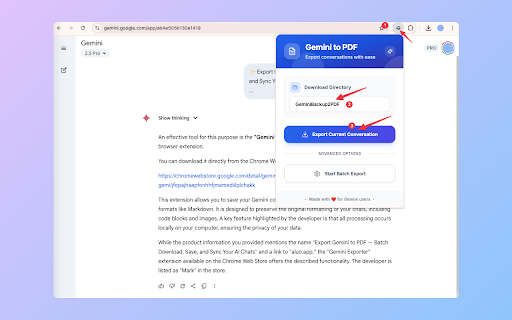
✨ Export Gemini to PDF — Batch Download, Save, and Sync Your AI Chats
Effortlessly export and batch download your Gemini (Google AI) chat conversations to clean, readable PDF files with a single click. No more copy-paste chaos—save, sync, and organize your AI insights, share with your team, or archive your knowledge for future reference.
🚀 Key Features
• Batch export: Download multiple Gemini chats to PDF at once
• One-click save for any conversation
• Preserves formatting, code blocks, and images
• 100% secure: All processing happens locally in your browser—your data never leaves your device
🛠️ How to Use
1.Open your Gemini chats.
2.Click the extension icon.
3.Instantly batch download and save your conversations as PDF files!
🔗 Useful Links
• Why-Gemini-to-PDF-started-debugging-this-browser-appears:https://chatgptsave.notion.site/Why-Gemini-to-PDF-started-debugging-this-browser-appears-22510052f0c88061b682ef2f3d9acd90?pvs=74
• Product Documentation & Home:
https://chatgptsave.notion.site/Gemini-to-PDF-Home-22410052f0c88070996ae0d7c95053da
• Report Issues / Feedback:
https://github.com/aluoapp/export-gemini-to-Markdown/issues
🛡️ Privacy & Permissions
Your data is never uploaded—everything is processed and saved locally in your browser. This extension uses Chrome's built-in PDF generation capabilities, which requires the "debugger" permission. You may see a "DEV| Batch Export Gemini to PDF started debugging this browser" notification during PDF export—this is normal and expected behavior.
💡 Why Export Gemini to PDF?
• Batch backup and organize your Gemini AI research and notes
• Download and sync insights for easy sharing with colleagues or friends
• Archive important conversations securely for future access
Add to Chrome
Quick Info
- Version
- 1.2.0
- Size
- 365KiB
- Price
- Free
- Type
- Extension
Categories
Languages
Englishportuguês (Portugal)русскийукраїнська中文(中国)中文(台灣)日本語한국어


