Bookmark Clock v2
by Theodore Capinski1.0
2 reviews
221
users
Published
February 4, 2022
Screenshots

Description
A great way to know the time without having to look down at the dock. Especially useful if you have the dock set to autohide.
Will update a bookmark with the current time, in your local time zone.
To use:
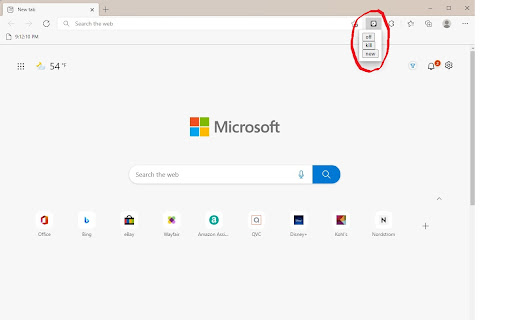
1) Press the extension icon
2) Click "new"
3) Click "turn on"
4) Open or reload any tab other than chrome.google.com or any chrome:// or edge://
5) Enjoy
New:
This will create a new bookmark, titled "Clock," where the time will appear, in your bookmark bar. You can move this bookmark anywhere you like, but I recommend keeping it in the main bookmark bar. If you cannot see any bookmarks, press CTRL + SHIFT + B to enable the bookmark bar. You can press this multiple times and every bookmark created will work.
Turn On/Off:
Toggles the bookmark updating. Allows you to edit or open bookmarks in the bookmarks bar, or if it is distracting.
***
Important Info:
If you have no existing bookmarks the "new" button doesn't work.
Does not work on system tabs (chrome://, etc)
Syncs with every device you are signed into.
No user data is collected at all.
FAQ:
HELP I CAN'T LOOK IN BOOKMARK FOLDERS OR RIGHT CLICK BOOKMARKS:
- Turn off the extension by clicking the icon and clicking "turn off." You can turn it back on whenever.