
SpeakGPT
by baabullah1.0
1 reviews
290
users
Published
June 29, 2024
Screenshots

Description
Are you tired of typing out your questions and responses to ChatGPT? Well, get ready to have a live conversation with ChatGPT using the amazing SpeakGPT Chrome extension! This revolutionary tool allows you to effortlessly communicate with ChatGPT through voice recognition and text-to-speech technology. Now with Tiktok voice!
All you have to do is click the microphone button, speak to ChatGPT, and listen to the response as if you're having a real conversation. It's that simple! And with the ability to customize voices, recognition language codes, and more, SpeakGPT is tailored to your unique preferences.
This extension works like a charm on your mobile phone too! Just install it on your Kiwi Browser and voila! Now you can chat effortlessly with ChatGPT on the go! 🚀
Prerequisite:
1. Login to ChatGPT website: https://chat.openai.com.
Instructions:
1. Install SpeakGPT Chrome Extension (add to chrome)
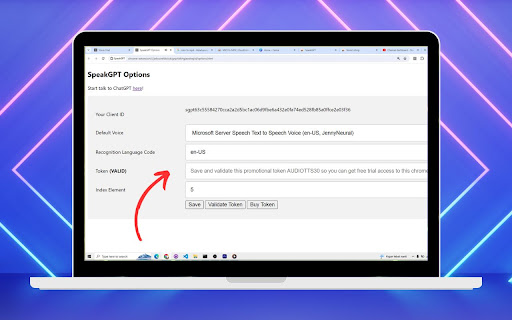
2. Open SpeakGPT options page chrome-extension://ijnkocnekkckckignphbbhgjeodoejid/options.html or kiwi-extension://ijnkocnekkckckignphbbhgjeodoejid/options.html
3. Set voice, recognition language, token.
4. Save button
5. Validate Token button
6. Go to the talk interface chrome-extension://ijnkocnekkckckignphbbhgjeodoejid/talk.html or kiwi-extension://ijnkocnekkckckignphbbhgjeodoejid/talk.html
7. Hit microphone button and start talking to ChatGPT