Gmail Button by cloudHQ
by cloudHQ4.6
46 reviews
30.0K
users
Published
November 29, 2025
Screenshots


Description
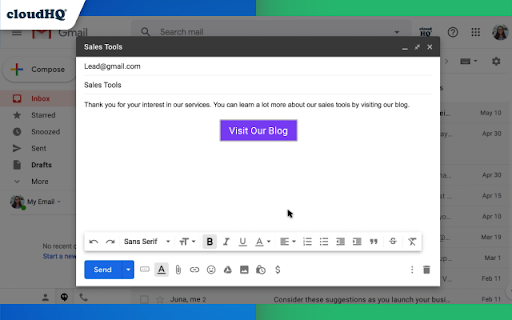
Did you know that you have 67% more of a chance that someone will click on a button in your email, than if you sent them a simple link?
With Gmail Button, you can create a button easily in about 30 seconds. You'll be able to make sure that your button has its own:
✅ URL link
✅ Background color
✅ Text color
✅ Border color
✅ Border size
This is great for sending people to your:
✔️ Blog Post
✔️ Website
✔️ Pricing page
✔️ YouTube movie
✔️ Meeting Scheduler
*Pro Tip: Try Gmail Meeting Scheduler for Gmail: https://chrome.google.com/webstore/detail/meeting-scheduler-for-gma/dibjpgjiefaibdinijeddhaiiphfhejp
✔️ An Amazon product page link
✔️ Anywhere else you want people to go
cloudHQ. Helping your productivity, 1 click at a time.
cloudHQ website: https://www.cloudhq.net/
App website: https://www.gmail-button.com/
Pricing: https://www.gmail-button.com/pricing
Support page: https://support.cloudhq.net/category/browser-extensions/gmail-button/
Blog: https://blog.cloudhq.net
Gmail and Google Workspace are trademarks of Google LLC. Use of these trademarks is subject to Google Permissions.
cloudHQ is trademark of CloudHQ LLC. https://www.cloudhq.net/trademark
Add to Chrome
Quick Info
- Version
- 1.0.2.8
- Size
- 650KiB
- Price
- Free
- Type
- Extension
Categories
Languages
DeutschEnglishNederlandsespañolfrançaisitalianopolskiportuguês (Brasil)português (Portugal)中文(中国)日本語