

Grok Usage Watch – Rate Limit Tracker
by Joshua Wang5.0
18 reviews
1.0K
users
Published
August 22, 2025
Screenshots

Description
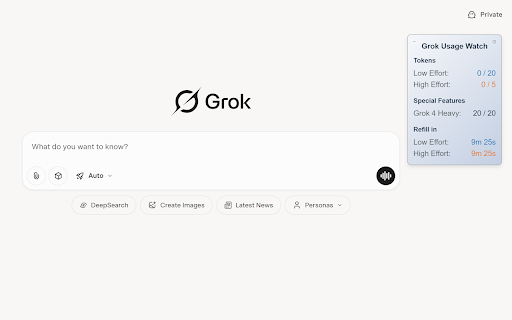
Grok Usage Watch is a lightweight browser extension that displays your remaining Grok usage directly on Grok.com.
It supports Grok 3, Grok 4, and Grok 4 Heavy, with a clean, draggable floating window that keeps your usage always visible.
⚡ Key Features
- Real-time usage tracking
- Supports both free and subscribed Grok users
- Draggable, floating overlay UI
- Refill countdown timer when limits are hit
- Light/Dark mode toggle
⚙️ Usage Logic
Grok has transitioned from a simple per-query quota model to an effort-based system:
- Low Effort: For simpler tasks
- High Effort: For more complex or resource-intensive tasks
- Grok 4 Heavy: Usage is calculated independently
The effort level is automatically assessed by Grok’s system, based on task complexity and estimated resource usage.
Legacy models such as Think and DeepSearch have been deprecated and replaced by Grok 4.
🔒 Privacy
Everything runs locally in your browser. No data is collected, stored, or shared.
⚠️ Note
This extension is not affiliated with xAI and depends entirely on Grok.com’s current public API. If xAI makes changes to the Grok.com website, the extension’s functionality could be affected. Should that happen, every effort will be made to restore compatibility as soon as possible.
Add to Chrome
Quick Info
- Version
- 1.3.0
- Size
- 58.91KiB
- Price
- Free
- Type
- Extension
Categories
Languages
DeutschEnglishFilipinoIndonesiaKiswahiliMelayuNederlandsTiếng ViệtTürkçecatalàdanskeestiespañolespañol (Latinoamérica)françaishrvatskiitalianolatviešulietuviųmagyarnorskpolskiportuguês (Brasil)português (Portugal)românăslovenčinaslovenščinasuomisvenskačeštinaΕλληνικάбългарскирусскийсрпскиукраїнськаעבריתالعربيةفارسیमराठीहिन्दीবাংলাગુજરાતીதமிழ்తెలుగుಕನ್ನಡമലയാളംไทยአማርኛ中文(中国)中文(台灣)日本語한국어


