

Syncia - Power of ChatGPT on any website
by Srujan Gurram5.0
10 reviews
513
users
Published
January 16, 2025
Screenshots



Description
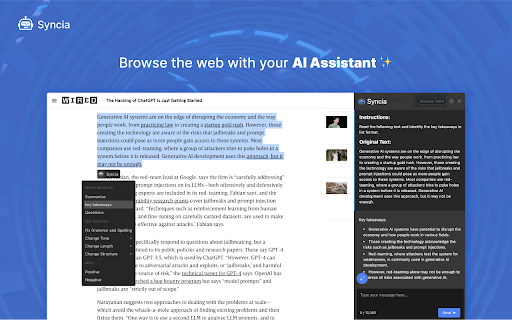
Syncia enables users to chat with ChatGPT by opening a sidebar on any website by using the shortcut ctrl+shift+x. In addition, it provides a floating menu underneath any selected text on any website that allows users to generate text summaries, check grammar issues, and customise text length so on !
🦾 Features
🗨️ Chat with ChatGPT through a sidebar.
🔑 Use your own Open AI API key.
📜 Quick menu underneath any selected text which allows you to summarise, simplify language, translate, and more.
🗂️ Allows to store custom prompts and use them with quick menu.
💯 Fully customisable settings page.
🔐 Secure and fully Free and open source forever. (Please consider giving this project a star 🌟 and contributing 💖 to support the project.)
For more info check out
https://github.com/Royal-lobster/Syncia
Note:
If shortcut is not working, Enter "chrome://extensions/shortcuts", under Syncia set new keyboard shortcut for "Open the sidebar"


