Miljo
by Nordic Cloud Labs5.0
3 reviews
30
users
Published
September 18, 2022
Screenshots
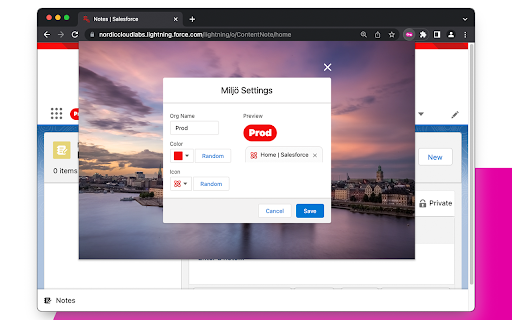


Description
Welcome to Miljö, a beautiful and helpful chrome plugin for Salesforce professionals.
It is hard to work with multiple Salesforce orgs and quickly tell them apart. E.g., a scratch or developer org looks very similar to a production org.
Miljö helps you tell them apart by giving them different names, colours, and icons. There are some extra goodies added as well.
Main Features
- Name the org, create a badge next to the app name in your org
- Assign an org colour that is used for the badge, favicon, login page, and production banner
- Add a favicon, using slds utility icons
- Warnings banner for production orgs
Additional Features
- Login window
- Expand the login window to display the full username
- The org colour as the background
- Print org type at the top of the screen
- Works in both Classic and Lightning Experience
How it works
1. Click on the icon when you are at one of your Salesforce org to open the settings
2. Enter a Name and select the colour and icon
3. Save to apply the change
Troubleshooting
The plugin icon does not appear in the toolbar.
You might need to pin the plugin to have easier access. Click on chrome's extension icon (puzzle piece). Then, click on the pin icon next to Miljo.
Thanks to
SLDS design resources
Beautiful photos from Unsplash by @micaelwidell and @raphaeldas