Proxy Toggle: Simple System Proxy Switcher
by SuperExt5.0
2 reviews
527
users
Published
September 10, 2024
Screenshots
Description
# Proxy Toggle: Simple System Proxy Switcher
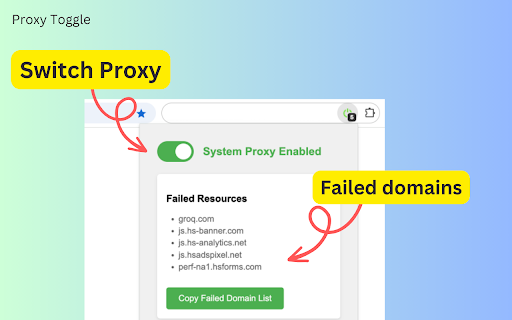
Proxy Toggle is a straightforward browser extension that allows you to switch between your system proxy and a direct internet connection with a single click.
## Key Features
- One-click toggle between system proxy and direct connection
- Visual icon feedback for current proxy state
- Remembers your settings across browser sessions
- Display and copy list of domains of failed resources (New feature)
## How to Use
1. Install the Chrome extension from the [Chrome Store](https://chrome.google.com/webstore/detail/bcalikfdfalhmdfinflciajgopeomhfb)
2. Click the extension icon in your browser toolbar
3. Green icon means system proxy is on, gray means direct connection
4. View and copy the list of failed domains, if any (New feature)
Perfect for developers, privacy-conscious users, and anyone who frequently switches between proxy and direct connections.
Simplify your browsing experience with Proxy Toggle!
## Open Source
This project is open source. You can view the code and contribute on GitHub: https://github.com/PlayerYK/ProxyToggle
## Changelog
### Version 1.1.0 (2024-09-09)
- New feature: Display list of domains that failed due to proxy
- New feature: Button to copy the list of failed domains
- Optimization: Copy button only shows when there are failed domains
### Version 1.0.0 (2024-08-30)
- Initial release
- Implemented basic proxy switching functionality
- Added icon state feedback