
YouTube PiP Extension
by priyanshu.air38505.0
11 reviews
3.0K
users
Published
December 4, 2023
Screenshots

Description
1. *Picture-in-Picture Mode*: Watch YouTube videos in Picture-in-Picture (PiP) mode while browsing other tabs or using other applications.
2. *Playback Control and Customization*:
- Control video playback with options to play, pause, skip videos forward and backward. You can also customize the playback speed to your preference.
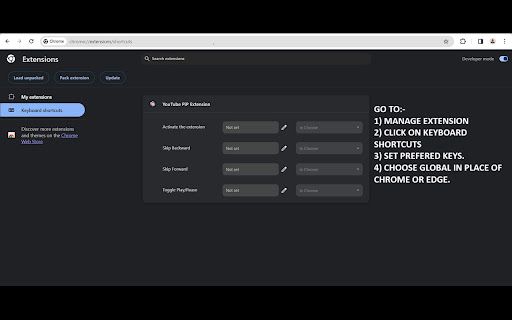
- Customize your shortcut keys for easy access to the extension's features. This includes setting up keys for playback controls like play, pause, and skip.
- Go to the 'Manage Chrome Extension' option to set up your shortcut keys. You can find the extension in the 'Keyboard Shortcut' option where you can add your preferred shortcut keys.
- Select the 'Global' option instead of 'Chrome' to access the extension's features from anywhere.
This extension enhances your YouTube viewing experience by providing a seamless way to watch videos while multitasking. Enjoy your favorite content without any interruptions!