Kanji Typer
by stephan.ribeiro5.0
1 reviews
538
users
Published
May 30, 2022
Screenshots


Description
This extension allows you to quickly look up and input Japanese kanji characters into input fields on any website, or copy a character into clipboard.
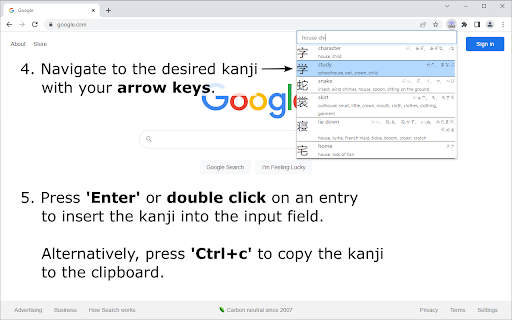
To search for a character, enter the character's keyword or a combination of its component names into the search bar, based on terms as presented in the well-known textbook series "Remembering the Kanji" by James Heisig. Fuzzy search functionality also allows you to enter only part of a keyword, or only a subset of a kanji's components, and then browse the list of matching results to find the desired kanji.
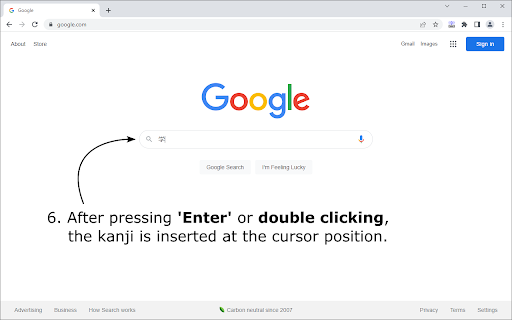
To select a kanji character, navigate to it by pressing the 'Up' and 'Down' arrow keys, or by clicking on it's entry once. Press 'Enter' to insert the selected kanji into a field on a website at the current cursor position, or press 'Ctrl+c' to copy it into your clipboard. A double click on any entry, directly inserts the respective kanji into the input field.
The keyboard shortcut 'Ctrl+Space' to open the extension popup can be changed in Google Chrome's extension management tab.
Add to Chrome
Quick Info
- Version
- 1.1.0
- Size
- 292KiB
- Price
- Free
- Type
- Extension
Categories
Languages
English (United States)
![Zero Two Wallpaper New tab Theme [Install]](https://lh3.googleusercontent.com/H92aZX6SUCR3hICMb0DJZdfsi3sibvrmQIPOAF00kX-gExnx7QHj6fWc2M9aqJemgfuadtslALOyRZh3hAAxFPSQ)