Chegg Notifier
by tripathiashish3935.0
1 reviews
100
users
Published
October 21, 2024
Screenshots


Description
This extension sends a notification to your Telegram app on your mobile phone whenever a new question appears on your Chegg dashboard. No more waiting in front of your laptop—get notified instantly wherever you are.
How to Use the Extension:
1. Add the extension to your Chrome browser.
2. Set up the Telegram bot:
Open your Telegram app and search for "CheggNotifierBot."
Click "Start" or type "/start" to begin. The bot will send you your chat ID(Refer screenshots above).
3. Link your chat ID:
In your Chrome browser, click the "Extensions" icon in the top-right corner. Click the Chegg Notifier icon to open a window where you can enter your chat ID(Refer screenshots above). Enter the chat ID provided by the bot. You're all set! Now, you’ll receive a Telegram notification whenever a new question appears on your Chegg dashboard. Just make sure the Chegg Expert Q&A page (https://expert.chegg.com/qna/authoring/answer) is open in Chrome.
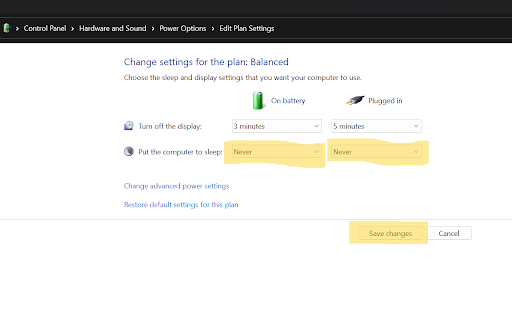
Important Note: The extension won’t work if your laptop goes to sleep due to inactivity. To prevent this, adjust your power settings:
1. Go to Control Panel → Hardware and Sound .
2. Click on "Change when the computer sleeps" under "Power Options"
3. Select "Never" from the dropdown for both "On battery" and "Plugged in" against "Put the computer to sleep" than click on "Save changes" (Refer screenshots above).
For quick query resolution, discussions, latest updates, and more, join our "Chegg Notifier GROUP" on Telegram.
Link: https://t.me/+tWV2fx5df9RjYTFl
Need Help or Have Suggestions? For feedback, suggestions, or support, email us at [email protected], and our team will be happy to assist you.