Simple Shortcuts
by Dovie Weinstock5
users
Published
December 15, 2025
Screenshots
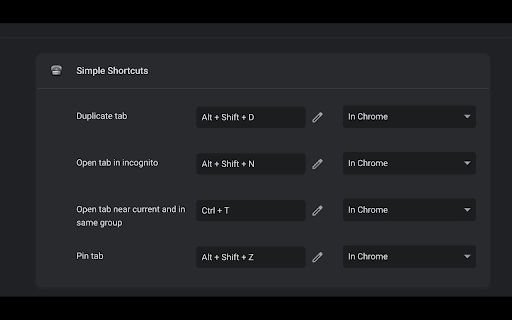
Description
Open-source: https://github.com/DovieW/simple-shortcuts
Currently adds these shortcuts with these default/suggested keymaps:
- Duplicate tab(s): Alt + Shift + D
- Open tab(s) in incognito: Alt + Shift + N
- Pin tab(s): Alt + Shift + Z
- Open new tab near current and in same group: Ctrl + E
- Open new tab at the end of the current group: Ctrl + Shift + G
- Open new tab at the end of all tabs: Ctrl + Shift + E
- Move tab(s) right: Alt + Shift + Right (or L)
- Move tab(s) left: Alt + Shift + Left (or H)
- Move tab(s) to start: Alt + Shift + Up (or K)
- Move tab(s) to end: Alt + Shift + Down (or J)
- Switch to last active tab: Alt + A
- Cycle windows: Alt + Shift + A
- Move tab(s) to different window: Ctrl + Shift A
- Toggle collapse all groups: Ctrl + G
- Move all groups to front/back: Alt + Shift + G
- Copy current tab URL to clipboard: Ctrl + Shift + C
- Go to home page of site: Ctrl + Shift + H
```
After extension is installed, tabs may have to be reloaded.
Add to Chrome
Quick Info
- Version
- 0.4.0
- Size
- 832KiB
- Price
- Free
- Type
- Extension
Categories
Languages
English (United States)