
ChatGPT to Evernote
by aluo4.0
13 reviews
1.0K
users
Published
December 15, 2025
Screenshots


Description
🚀 ChatGPT Backup, Export, Download & Sync — Save All Conversations to Evernote
ChatGPT Chat History Saver to Evernote is the ultimate tool to backup ChatGPT conversations, export ChatGPT history, download ChatGPT chats, and sync ChatGPT to Evernote — all in just a few clicks.
Whether you want to save a single ChatGPT conversation or bulk export all ChatGPT chats for a full backup, this extension keeps your AI-generated content safe, searchable, and accessible anytime.
🚀 Key Features (Export • Sync • Backup)
• One‑click export — Instantly save any ChatGPT conversation to your Evernote notebook
• Batch sync & backup — Build a durable archive by syncing multiple chats at once
• Pages sync options — "Latest 28" or "All Conversations" for quick full/partial exports
• Project sync (Gizmos) — Export entire ChatGPT projects; project name auto‑added as an Evernote tag
• Team & personal support — Works with personal and team ChatGPT accounts
• TextDocs tools integration — Append tool outputs and related TextDocs content to notes for full context
• Sync history panel — Per‑batch stats, JSON/TXT export, and one‑click retry of failed items
• Smart retry — Concurrent, rate‑aware retry with progress feedback
• Rate‑limit handling — Detects Evernote API limits and shows a countdown before next run
• Token auto‑refresh — Content script refreshes ChatGPT session token to reduce auth issues
• Custom tags & notebooks — Organize your archive with your own Evernote structure
• Smart titles — Auto‑generate descriptive titles for saved notes
• Original link retention — Keep original ChatGPT conversation URLs for reference
• Local download option — Export conversations as files for offline storage
• Evernote search integration — Quickly search your saved ChatGPT backups
⚙️ How It Works
1.Install the ChatGPT Saver Extension → Sign in to Evernote via secure OAuth.
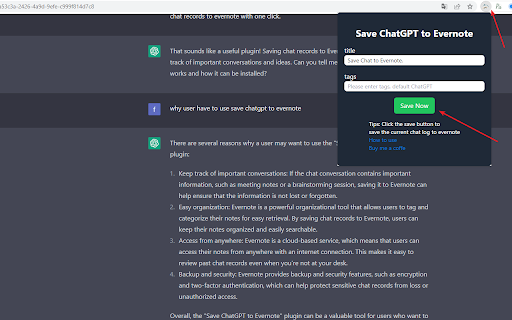
2.Save Single Conversations → From the popup page, save one ChatGPT chat instantly.
3.Save All ChatGPT Conversations in Bulk → From the batch export page, backup and sync your entire chat history.
4.Organize Your ChatGPT Backups → Add tags, choose notebooks, and edit titles for better management.
5.Search Your ChatGPT Archive in Evernote → Instantly find any conversation you’ve backed up.
💡 Why Backup & Sync ChatGPT to Evernote?
ChatGPT conversations often include valuable insights, research data, code snippets, and creative ideas. Without a reliable backup, these chats may be lost forever.
By exporting ChatGPT history and syncing it to Evernote, you can:
• Maintain a permanent ChatGPT archive
• Export & download ChatGPT conversations anytime
• Search and organize ChatGPT backups with Evernote’s tools
• Access your ChatGPT chat history from any device
🎯 Perfect For
• Researchers — Backup and search AI insights
• Developers — Save code solutions and technical discussions
• Writers — Export and store creative drafts
• Students — Download study notes and Q&A for revision
• Professionals — Maintain a searchable ChatGPT knowledge base
🔒 Privacy & Security
• Secure Evernote OAuth authentication
• No ChatGPT data stored on third-party servers
• All ChatGPT export & backup operations happen locally in your browser
📧 Support: [email protected]
🎥 Video tutorials & FAQs included
👉 Download ChatGPT Chat History Saver to Evernote now — and start backing up, exporting, downloading, and syncing all your ChatGPT conversations to Evernote today!
🔄 Changelog
2025-12
• Added support for note/comments content when exporting individually,
2025-11-04
• Added Project (Gizmos) sync to Evernote, with project name auto‑tagging
• Added TextDocs tools integration: append tool outputs and TextDocs content to notes
• Added Sync History panel: per‑batch stats, JSON/TXT export, and retry failed items
• Added concurrent retry with basic rate‑aware pacing
• Updated Pages sync UX: "Latest 28" and "All Conversations" radio options
• Added auto token refresh in content script to improve reliability
• Minor UI/UX polish and stability improvements
Add to Chrome
Quick Info
- Version
- 5.4.0
- Size
- 167KiB
- Price
- Free
- Type
- Extension
Categories
Languages
Englishfrançaisрусский中文(中国)中文(台灣)日本語한국어